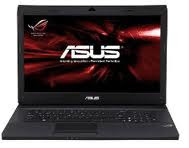
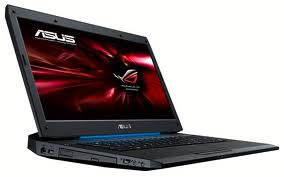
Asus G50vt- X1Welcome to the review of the Best Buy Asus G50vt –X1. This unit packs in some impressive features and hardware specifications for the price range, that's for sure! Not only that, but it's got some really interesting looks, giving the old Alienware theme a run for their money with glowing side panels, touchpad area and a fun OLED screen on the top – but it being an “affordable” gaming rig, where did it fall short if anywhere? Read on to find out...
DesignCase look and feel
This laptop has one impressive look to it – it's got a funky futuristic tribal paint scheme on the lid that grabs anyone's attention that's for sure. I'm a fan of color – and luckily like it's bigger sister the g70 (which is available in red...) screams some personality. Luckily however, good looks aren't all that the G50 has going for it. The actual case surrounding the keyboard and composing the palm rest feels solid and has a nice 'honeycomb' texture accented with silver areas and more matching blue lighted areas (when turned on). The feel can be described as “beefy” for a 15.6” laptop, I wouldn't call it obese, but it does have some bulk to it...speaking of bulk...
Size & WeightThe weight is a bit on the heavy side for a laptop of this size at 7.3 lbs. Also kind of disappointing is the size of the power supply – it is quiet larger than most standard 15” laptop supplies go. And being it a 15.6” (1368x768) display – it packs a full numeric pad on the side, but that means the bezel surround takes up the rest of the “real estate space” normally saved for a LCD. The size measures in at: 1.6 x 14.8 x 10.4 inches – and you'll find those dimensions to be some what cumbersome when shopping for a bag for this unit. It's just that much slightly larger than a 15.4” that makes the normal “pickup/packup” scenario a bit wary. Nothing detrimental, but keep that in mind when shopping for something to carry it – fit it in the bag first...with the power supply!
KeyboardThe keyboard feels good, has nice tactile response and travel – nothing incredible to mark down on that area. Flex wasn't an issue so much as the chassis on this unit seems very rigid and constructed well. The standard layout doesn't seem interrupted and keys seem to flow well. The area just above the keyboard features some touch sensitive hot launch areas that serve their own good place/time functions. However, one thing that kind of funked me out is the numpad on the right hand side. Yes – it's great it's there, but it just seemed a few mm too close to the regular keyboard for me. And it seemed a bit small for me, as I'm used to a more normal sized 10 key and it's spacing that it made me frustrated to adjust to it as it was. This is completely personal, but keep it in mind and spend a good few minutes in the store punching away and see if you mess up as much as I did.
TrackpadLiked the touchpad – it's a Synaptics touchpad so you really can't go wrong, they have good hardware and response. However, I wouldn't recommend using it for FPS or driving gaming – it does track well but that's not what it's meant for. I will say that there was a bit of confusion as to the black plastic embellishment above the pad – it doesn't light up, and it seems out of place a bit. Also to note, this isn't a flush trackpad which, actually, I don't mind. It gives a user good tactile response and representation of where a scroll area is, and when you're at the 'edge' and need to 'pick it up and scoot some more'.
Display qualityTo me, half the point of having a dedicated
gaming laptop is to take advantage of the graphics processing power it can and will output – and if your display can't take advantage of those higher resolutions making flesh to fresh you would swear “they are real...” but this is where I feel the G50vt-X1 lets a gamer down immensely. Yes, it's technically .2” larger than other displays, but it's pixel count for the size make it just like a smaller screen with less resolution, and anything less than 900px in height makes me wonder what were they thinking (besides making the X2 which is the non Best Buy bargain maker...) So – the kudos of half points for being a gaming rig are lost....but not entirely. At this price range, I know Asus had to do some sort of compromises, I just wish it wasn't on the panel! Knock out 2gb of Ram, drop the HDD size a bit, and maybe toss out the lightscribe drive and you could have had a much more decent panel – and left the upgrading to the marketable “geek squad”?
Besides the lack of resolution, I had issues with the color – it was a bit washed out, contrast wasn't up to where I hoped it to be, and the viewing angles were worse than the Toshiba E105 I just reviewed. Again, if it falls short on one big thing, it's the LCD panel.
Connectivity descriptionFor a bargain gaming rig, you get some neat and ample connectivity options. I'd call it well above average actually, but sheesh, no bluetooth? Get rid of that crazy A/b/g/n card and get bluetooth in this thing pronto! Speaking of wireless N, this machine has it and if you have the router, the extra boost in network speed is greatly appreciated. At 150 mb/s I got, it was awesome for networking or would do pretty good for peer to peer gaming. HDMI is welcomed, but again – no blu-ray to take advantage of hooking it up to a massive display. Output to second monitor was finicky – mostly due to power schemes running on battery.
Here's the breakdown of each side of the G50vt-X1:
Left: VGA, usb, tuner (not supplied or operational) mini-firewire, e-sata, HDMI, and multicard reader.
Front: wireless switch and ir port thats hinging on doubt that it's operational.
Right: Audio in / out , spdif, 2 more usb ports and the DVD drive with label flash.
Rear: Wow, some more options...lock slot, usb 2.0, networking slot and power plug.
Bottom: Subwoofer – which, wasn't that impressive but it was decent for a laptop. [edit: this wasn't even a subwoofer as it turns out, but just an air intake (thanks, Sean].
Upgrading possible?
A big box store has packed it to the brim pretty much, you already have 320gb hard drive space, 4gb of Ram (which is usable with the 64bit Windows OS thankfully!). And since this packs a hefty graphics card and a very capable CPU (Intel® Core™2 Duo Mobile at 2.26GHz) the only thing I would say that you could go a little crazy on would be trying to put a higher capable processor in to make it scream a bit more – but most users purchasing this unit won't be opting for that route, and there's software to overclock that speed a bit (even included with the machine). So, is upgrading possible? Yes, recommended? No. Unless you figure out a better LCD panel...
FeaturesRunning down the list of features for this laptop, I noticed that this unit has a lot of things going for it, especially considering it's price tag. First and foremost – a very capable GPU for moderate to more intense mobile gaming. A Nvidia 9800GS -M, clocking in its 512mb of DDR3 ram and a core speed of 530 MHz, it runs comparably between a 9700GT and a 9800GTS.
HDMI means taking advantage of a higher resolution external display, which, you might severely consider after seeing the current display, and also noting, unlike the e-105 from Toshiba, Asus recognized that old-school VGA still has a place for some people and decided to keep it there – which I like.
A/B/G/N is nice, but like I stated earlier, I'd take bluetooth over the A rated frequency any day.
Webcam is normal, nothing special to me, had OK tracking and the color was acceptable. Perfect for what it is and is used for in my opinion.
An interesting feature however, is the built in mini-OLED display above the keyboard. You can customize it's display and have it cycle through memory, CPU, custom message, etc. Using the Direct Console program. I found it somewhat of a novelty for casual users, but some may find it useful, especially when running memory intensive programs/games. However, no brightness setting and you can't actually just turn it off.
Speakers:OK, I have to wonder what the real issue is with this laptop and it's speakers. At some points, they offered great sound, good intonation (acceptable anyways for a laptop) but when I tried it through the movies, it was weak. Very weak sounding – no volume at all. I scoured the internet and tried all suggested techniques – turning of the Dolby simulated output, setting it to live, reinstalling the drivers, using the direct console to put it into entertainment mode...none of it worked for my DVD. It sounded hollow, very low in volume, and nothing changed. Otherwise during the gaming testing it sounded great, full volume and offered even better performance for 3D output. It maybe that the 5.1 output through WMP somehow hinders the volume settings, but I can't nail it. I guess, the best bet I can tell you is that I had issues with it, and it's something you might as well, so please keep it in mind!
Performance & Conclusion
Performance
Here's probably what you were really waiting for – forget all the frills and stills of this laptop, in being a gaming rig, you want to know how it really pushes things for you pixel-shading performance freaks. So, before we get going with this, head on over here if you're confused on we test laptops with dedicated GPU's.
Windows Vista Experience Score: 5.2
Everything on this laptop was rated at 5.9 except for the CPU – which is understandable since it's only rated at 2.26ghz, but 5.2 is a very respectable score.
PCMark Vantage Pro: 3935
It's got the goods so far, the performance is matching very well to the dollar amount – leading me to think this is still a great bang for the buck.
3DMark Vantage: E8541
Ok – so, I'm a little confused as to why the score for the 3DMark program kept crashing the display drivers on anything other than entry, but giving that some laptops can't even break 3000 points in Entry mode, this laptop blows it pretty good out of the water. I leave the display drivers, vista, and normal karma for a mobile graphics card at rest as to why it didn't work on performance settings.
WorldBench 6: 75
Ok – so, this also had MASSIVE problems regarding time outs and display hangs, defrag problems and due to the software startups and pop-ups Vista was throwing at the machine, it only successfully completed 80% of one of three runs. I suspect this score is not the true definition of the hardware specs involved with this machine – as it's far less than expected, in being the m70 we tested tossed out a near 92 points, this seems like it should be right up there.
Battery Performance:
DVD: 80 minutes
Nope – this is no travel entertainment laptop. To me, it was very weak. Any laptop that is 15.4” should last at least 90 minutes (close to finish that b rated comedy/comic book movie) but it didn't on this machine. I would even go as far as say that if you got rid of the “woofer” at the bottom of the unit, and opted for a larger cell unit into the chassis structure, you would make a lot more dent in the mobility market, but again, this probably isn't what it's marketed for, nor what people will be buying it for. Take is as you will. Also note – it also appears that the DVD drive likes to powerdown TOO much on entertainment mode (not sure why...) and caused the display drivers to crash 3 times during the movie, causing a restart of the whole testing process. Talk about a pain, no big deal maybe if you update the drivers, tweak the power schemes or don't mind restarting your movie every 20 minutes...but I didn't. At the end, I had to keep on with the test and mark the time alloted towards battery use to restart the DVD and enter the menu to find my scene.
Casual use: 110 minutes – Battery saver: 2 hours
2 hour use using a battery saving power scheme and 50% brightness is decent, but nowhere near what other 15.4” laptops are at. Also noting, I don't like the way the Asus handles it's power scheme management. I found that when using the console to select “power4gear battery saver” - it would change the desktop, and remove all my icons, and reduce the display brightness (normal) AND bit rate (not normal). Why reduce the bit-depth and toss the icons is beyond me, and honestly, seems silly.
Gaming:
FEAR:
800x600 – High detail
At 800x600 I tossed the game around like a rag doll – constant 50-55 fps. The G50 plowed through the single player demo and made it looks good doing it at this resolution. The sound however, had some stuttering moments along with when things seemed to get intense, there what seemed to be lag on the CPU end...
1024x768 – high detail
Again, the G50 had no problem running this on high detail...except it would sometimes hang the driver again...and it was also very finicky on how well it handled the graphics in some parts. REALLY lagging in normal areas (20-22 FPS) when walking, but if I let it pause and not do much and then continue, it would jump back up to 44-47 fps. Firefight moments dragged it down to mid 30's – so game play is doable, you just might want to knock down some settings a bit.
Crysis (64bit) single player testing:
Using the software testing method and utilizing it to GPU testing, it gave us some quick numbers in formats for you to see the different methods and performance gains the 9800M can pump out on this very intense game.
DX10 1024x768 AA=No AA, 64 bit test, Quality: Medium ~~ Overall Average FPS: 33.29
DX10 800x600 AA=No AA, 64 bit test, Quality: High ~~ Overall Average FPS: 23.98
DX10 1024x768 AA=No AA, 64 bit test, Quality: High ~~ Overall Average FPS: 20.18
DX10 1280x720 AA=No AA, 64 bit test, Quality: Very High ~~ Last Average FPS: 10.67
Overclock extreme (ASUS utility):
DX10 800x600 AA=No AA, 64 bit test, Quality: Medium ~~ Last Average FPS: 35.97
DX10 1024x768 AA=No AA, 64 bit test, Quality: Medium ~~ Last Average FPS: 28.46
DX10 1024x768 AA=No AA, 64 bit test, Quality: Very High ~~ Last Average FPS: 11.90
You'll notice that No Anti-Aliasing was chosen on any of these tests, thats because, the demo would refuse to run with any sort of AA applied, which, I'm not sure why this happened. It would hang the drivers, terminate the program and come straight back to the testing screen. This was also my basis for testing out the “apples to apples” version of the overclocking function built-in on the G50 unit. You'll notice that you do gain some performance, but is 2 FPS really worth the stress on what it's doing? I leave that up to you.
Unreal Tournament 3: Single Player Demo
Fortunately, if you have this game – go ahead and max out the settings because except for some extreme rare cases of lag (due to respawns and big confrontations) I found this machine screamed through this game and handled all the effects extremely well. This was the most fun to run around in and since everything looked so nice (minus the belittled resolution) I didn't have anything bad to say about it's performance. It pretty much stayed at a nice comfortable 50-60 FPS range. Very nice indeed.
Real Life Usage:Using the G50 in real life – I have to admit, it didn't get out to any coffee shops, LAN parties, or power point presentation meetings...however, what I did encounter that for the most part it was very reliable in it's performance, and understanding it's limitations helped me justify that this is a pretty decent bang for the buck. Yes, there are other gaming machines out there with slightly better performance hardware / aspects, but for the most part, everything a casual / higher end gamer could need in a mobile platform is there...
ConclusionWell, here it is. My conclusion statement. I'd like to state that even being a reviewer, I'm sometimes torn between what I feel should be a part of a gaming unit vs. what is available to consumers. With that said, I do feel you are getting a lot of decent gaming power here, but I do feel the skimped out on a few key essentials to make it a real bargain buster of the year. Is it to say that you won't find a better deal than the $1,299 advertised MSRP? Nope, and with the holiday season right around the corner, I'm sure that the big box giant Best Buy will offer some sort of sale. Do I feel that it's the best mobile gaming rig out there, no, it does fall short on some aspects (including battery life.) But I will say this, it has some really nice looks, some extra frills, offers nice connectivity and very good performance for it's price. If you were looking for a moderate laptop to do some gaming on (or take advantage of the CS4 graphics utility now) I would highly recommend looking into this machine. But keep in mind, if you want to push that pixel count higher than what it has built in, I would look elsewhere, and spend the coin on a better display, and if you're doing that, spend it on a slightly more updated GPU that can handle AA a little better to take advantage of it.
Bottom Line:Good at moderate gaming, light entertainment, and holds it's own for the design points. Otherwise, falls a bit short on being a blow out bargain buster for a high end gaming rig, but otherwise it gets good scores and performs well.
ASUS Eee PC 1000HE Notebook ReviewAsus Eee PC VX6 Lamborgini
Asus Eee PC 1015B Laptops The BestAsus Launches New U30S Laptops ReviewAsus Eee Pad Transformer RerviewSource[laptoplogic.com]


 ASUS G53SW-A1 specifications:
 Performance